

Missing or unclear fields
Flag missing ticket numbers, unreadable ticket photos, and incomplete load details before invoice cleanup starts.
Construction ticket OCR
Turn driver ticket photos into cleaner review workflows for haul tickets, scale tickets, materials, tons, invoices, and operator payables — built for construction hauling and aggregate workflows, not generic document scanning or long-haul freight TMS.
Not generic OCR
Construction ticket OCR is not the same as scanning office paperwork. Haul tickets, load tickets, scale tickets, and dump truck tickets arrive from job sites with handwriting, glare, folds, and missing context — and billing still depends on getting the details right.
DirtLogics brings construction ticket OCR into dispatch and billing so teams can collect driver ticket photos, review extracted ticket data with AI, and keep receivables and operator payables organized — not buried in another standalone scanner app.
Field ticket capture
Construction ticket scanning starts when drivers can upload ticket photos from their phone without another app download. DirtLogics sends SMS upload links tied to the dispatch so haul tickets, load tickets, and scale tickets stay connected to the right job from the start.
Learn more on the driver ticket upload page.
AI-assisted ticket review
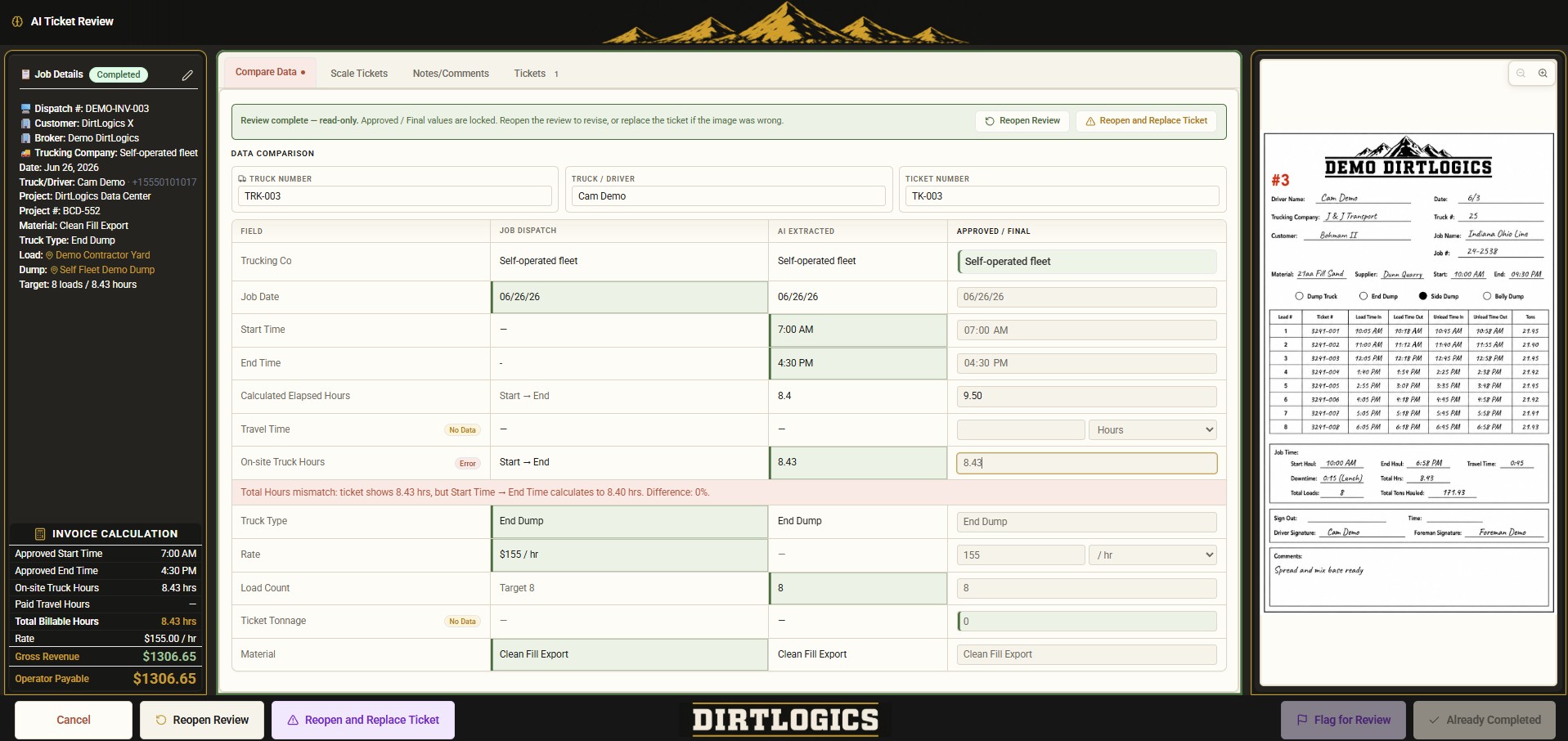
DirtLogics uses AI-assisted construction ticket OCR and review to help your office extract ticket data from driver photos, flag problems, and approve cleaner records before invoices and operator payables go out.
Flag missing ticket numbers, unreadable ticket photos, and incomplete load details before invoice cleanup starts.
Identify duplicate uploads, unclear photos, and billing-risk tickets before they become receivable or payable problems.
Compare dispatch context against extracted tonnage, hours, dates, and load counts so wrong tons surface early.
Help reviewers catch when ticket material, job context, or trucking company details do not line up with the dispatch record.
See the full review workflow on the AI ticket review page and scale ticket software page.
Dispatch to billing
Construction ticket OCR should not stop at extracted text. DirtLogics connects scanned ticket data to dispatch jobs, customer receivables, operator payables, and billing history in one workflow.
Capture customer, job name, job number, material, trucking company, driver, and truck context before tickets arrive.
Drivers upload haul tickets, load tickets, and scale tickets through phone-friendly upload links tied to the dispatch.
AI-assisted OCR extracts ticket numbers, tons, hours, materials, and truck details for office review before billing.
Reviewed ticket data supports customer receivables, operator payables, and cleaner invoice cleanup for brokered and hired trucks.
Start from construction dispatch software, then see how reviewed ticket data supports billing on the invoicing and payables page. Brokers can also explore broker dispatch workflows.
Aggregate & dump truck hauling
Construction ticket OCR should understand the materials and locations your teams haul every day — aggregate, gravel, sand, rock, asphalt, dirt, demo, and base material from pits, quarries, plants, and job sites through to delivery locations.
See aggregate hauling software for material-haul workflows and dump truck dispatch software for dump truck dispatch, ticket collection, and billing cleanup in one connected path.
Who it is for
Scan brokered truck tickets by load, catch missing or duplicate haul tickets early, and keep receivables and operator payables separated with clearer ticket evidence.
OCR quarry tickets, pit tickets, and scale tickets for gravel, rock, sand, and base material — then review tons and materials before billing cleanup.
Collect hired-truck ticket photos, review haul ticket OCR output against job context, and reduce payable cleanup after the haul.
Move material from source to delivery with ticket numbers, load counts, material names, and operational visibility built for construction hauling tickets.
Dispatch your own drivers, collect ticket uploads, review construction ticket OCR data with AI, and keep fleet billing and payables organized.
Questions
Construction ticket OCR helps construction trucking teams extract data from driver ticket photos — haul tickets, load tickets, scale tickets, and material tickets — then review that data before billing. DirtLogics connects ticket capture, AI-assisted OCR review, dispatch, receivables, and operator payables in one workflow.
Yes. DirtLogics helps teams scan and review haul tickets, scale tickets, load tickets, quarry tickets, pit tickets, and dump truck tickets with AI-assisted extraction focused on construction hauling fields like tons, hours, materials, ticket numbers, and truck numbers.
Yes. Drivers can upload ticket photos through job-specific SMS upload links sent from the dispatch workflow, so construction ticket scanning starts with photos tied to the right haul and load record.
Yes. AI-assisted ticket review helps extract and flag ticket numbers, tons, hours, materials, truck numbers, drivers, and other load details from driver ticket photos so office staff can review before billing.
Yes. DirtLogics helps teams see missing ticket uploads, duplicate ticket photos, unclear images, and review flags before customer invoices and operator payables are built.
Yes. DirtLogics helps teams review construction ticket OCR output including tons, hours, load counts, ticket numbers, truck numbers, drivers, material names, and job context against the dispatch record.
Yes. DirtLogics is built for aggregate hauling, dump truck hauling, quarry and pit tickets, asphalt and gravel loads, and other construction trucking ticket workflows — not generic freight TMS, GPS fleet tracking, or standalone document OCR tools.
Yes. After construction tickets are scanned and reviewed, DirtLogics helps teams organize customer receivables and operator payables with clearer load, material, and ticket context for invoice and payable cleanup.
See it live
Get a demo to see how DirtLogics helps dump truck brokers, aggregate haulers, contractors, quarry operations, and self-managed fleets collect driver ticket photos, review haul tickets and scale tickets with AI, and keep invoices and operator payables moving from one workflow.